Lottery Safe Report - Store Employee
Lottery Safe Report Overview
The "Lottery Safe Report" provides a detailed summary of the lottery safe inventory across all stores. It captures key information related to the current books and tickets assigned to each store's lottery safe.
This report helps monitor the availability, movement, and tracking of lottery games within the safe, offering insights into store-level activity and compliance. It is especially useful for auditing purposes and ensuring accurate reconciliation of lottery inventory.
1. Reaching the "Lottery Safe Report"
To reach the "Lottery Safe Report," follow the steps below:
- Step 1: Log into Control Center
- Step 2: Choose Location
- Step 3: Choose Reports
- Step 4: Choose Lottery Reports
- Step 5: Choose Lottery Safe Report
See Figure 1.1. You will see many types of lottery reports that will be useful to your retail business. By clicking the drop-down selection, you will see the different kinds of lottery reports.
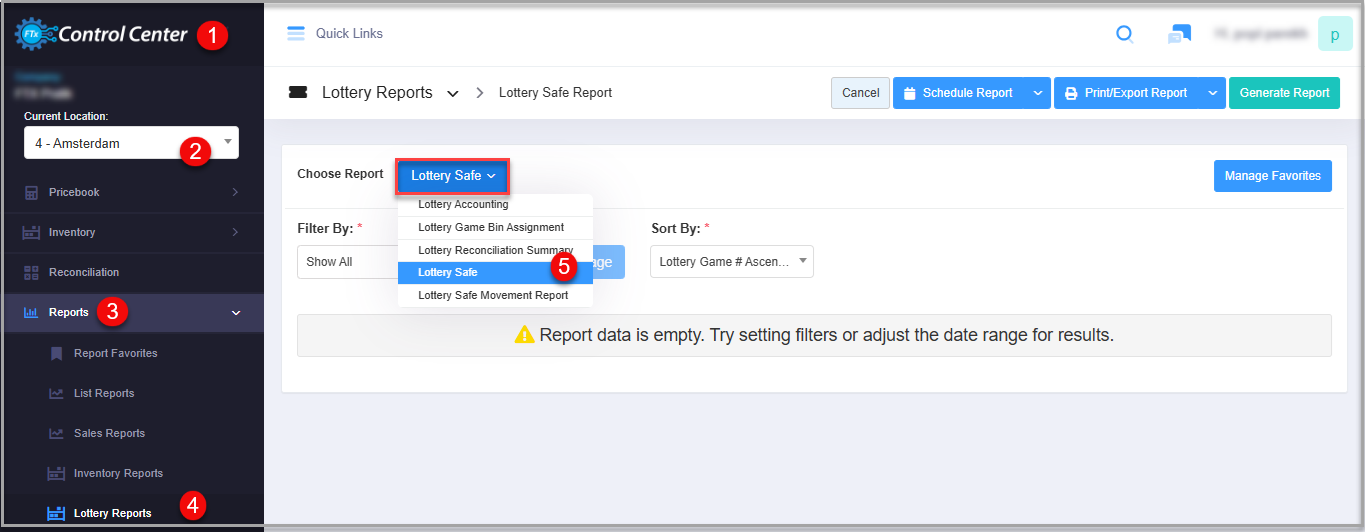
Figure 1.1
2. Understanding the "Lottery Safe Report"
You will initially see the "Report Data is Empty" message. You need to select the filter options to check the Lottery Safe Report. See Figure 2.1.
Figure 2.1
3. Generating the "Lottery Safe Report"
When you navigate to the Lottery Safe Report page, you will see the options pre-selected by default. You can generate the report with different filters.
Figure 3.1
Fields:
- Lottery Game Number: The lottery game number that is defined in the lottery game module.
- Lottery Game Name: Here, the name of the game is mentioned in this column defined in the lottery game module.
- Location: The name of the location is mentioned here in this column.
- Number of Books: This column displays lottery-safe information at the selected store.
- Number of Tickets: Here, the number of tickets that are in the lottery ticket books is displayed.
3.1 Filter By:
This field has an attached drop-down menu consisting of two options:
- Show All: This option will display the data in the reports for all created discounts in the system. See Figure 3.1.1.
- Lottery: This option will display the list of lotteries on the Manage Filter page to select lotteries from. When the list is selected, the report will display data related to that list of lotteries.
Figure 3.1.1
Manage Filter Screen Information:
Manage Filter Screen Information:
1. Search: Use this search box for a specific result.2: Results: Here, you see the relevant list of data for the selected lottery. You can search for a specific lottery in the Search bar as well.
3: Checkboxes: Select the required products by checking the appropriate checkboxes.4: Arrow: Click the green Arrow button to move the selected records to the Selected List area as highlighted in
5. Click the "Clear Selection" button to remove the whole selection. To remove any record from the list, click the Remove (X) icon.
6: Apply/Close action buttons:
- Apply: Click the "Apply" button for the selected parameters. The system will navigate you to the Lottery Safe Report home screen. Click "Generate Report." The system will generate reports based on your selection.
- Close: Click to close the Manage Filters window.
The filtered report:
Figure 3.1.2
4. Sort By:
This field will let you sort the report in different ways.
- Lottery Game # Ascending: If this sorting option is chosen, the Lottery Safe Report is sorted in ascending order of the lottery game number.Figure 4.1
- Lottery Game # Descending: If this sorting option is chosen, the Lottery Safe Report is sorted in descending order of the lottery game number.Figure 4.2
- Game Name Ascending: If this sorting option is chosen, the Lottery Safe Report is sorted in ascending order of the lottery game name.
Figure 4.3
- Game Name Descending: If this sorting option is chosen, the Lottery Safe Report is sorted in descending order of the lottery game name.
Figure 4.4
- # of Books Ascending: Each lottery book has a unique number in addition to the game number, so if this sorting option is chosen, the Lottery Safe Report is sorted in ascending order of the lottery ticket books.
Figure 4.5
- # of Books Descending: If this sorting option is chosen, the Lottery Safe Report is sorted in descending order of the lottery book number.
Figure 4.6
5. Scheduling a Report
FTx Cloud POS supports report automation. You can configure a report and schedule it. The system will send the scheduled report to the indicated email IDs at the defined frequencies (daily, weekly, bi-weekly, monthly, quarterly, etc.).
6. Printing/Exporting a Report
You can print or export any report according to your requirements. When you use the Print function, the system creates and opens the report's PDF file in a new tab. You can download the soft copy or print the paper copy according to your requirements.
7. Manage Favorites
FTx Cloud POS allows quick access to the reports you need to view frequently through "Favorite Reports." You can save a report as a favorite and manage all your favorite reports from any of the report screens using the "Manage Favorites" button.